
1,新建带宏的Excel:提交管理.xlsm。
2,构建如下内容结构。
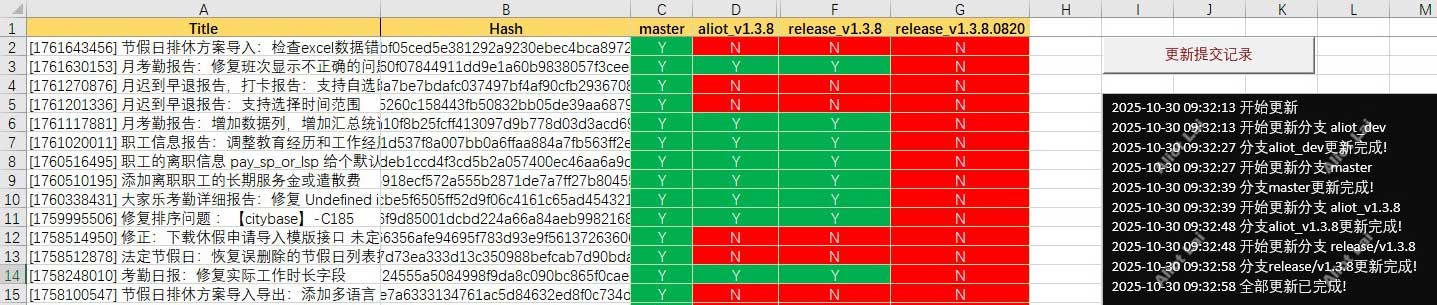
3,给“更新提交记录”的Button创建以下宏。
Sub UpdateBranchCommits(branch As String)
    Dim fileContent As String
    Dim lines() As String
    Dim line As String
    Dim parts() As String
    Dim i As Integer
    Dim fileNum As Integer
    Dim fileSize As Integer
    Dim fileLoc As Integer
    Dim branchName As String
    Dim sheetName As String

    Dim ws As Worksheet

    Dim wsShell As Object
    Dim gitPath As String, repoPath As String, outputFile As String
    Dim cmd As String
    Dim output As String

    If branch = "" Then
        Exit Sub
    End If
    On Error GoTo SheetNotFound

    sheetName = Replace(branch, "/", "_")
    ' 设置要操作的工作表
    Set ws = ThisWorkbook.Worksheets(sheetName)

    UpdateStatus "开始更新分支 " & branch, True

    On Error GoTo ErrorHandler

    gitPath = "C:/Program Files/Git/bin/git.exe"
    outputFile = "D:/project/hrm/git." & sheetName & ".txt"
    repoPath = "D:/project/hrm/hrm"
    branchName = "origin/" & branch

    Set wsShell = CreateObject("WScript.Shell")
    ' 先执行fetch
    cmd = "cmd /c cd /d " & repoPath & " && """ & gitPath & """ fetch "
    ' Set exec = wsShell.exec(cmd)
    ' output = exec.StdOut.ReadAll
    wsShell.Run cmd, 0, True ' 隐藏窗口执行

    cmd = "cmd /c cd /d " & repoPath & " && """ & gitPath & """ log " & branchName & " --author=""Aliot_Lai"" --no-merges --encoding=GBK --pretty=format:""%s#####%H""  > " & outputFile
    ' Set exec = wsShell.exec(cmd)
    ' output = exec.StdOut.ReadAll
    wsShell.Run cmd, 0, True

    ' 检查文件是否存在
    If Dir(outputFile) = "" Then
        UpdateStatus "文件不存在:" & outputFile, True
        Exit Sub
    End If

    Set stream = CreateObject("ADODB.Stream")
    With stream
        .Type = 2 ' 文本模式
        .Charset = "gbk" ' 强制指定编码(关键)
        .Open
        .LoadFromFile outputFile
        fileContent = .ReadText ' 读取全部内容(含中文)
        .Close
    End With

    Set stream = Nothing

    If fileContent = "" Then
        UpdateStatus "文件为空或无法读取!", True
        Exit Sub
    End If

    ' 按行分割内容, 检查发现 git log生成的文件里的换行符是 n,而不是window的 rn
    lines = Split(fileContent, vbLf)

    fileSize = UBound(lines)
    ' 遍历每一行并更新单元格
    For i = 0 To UBound(lines)
        line = Trim(lines(i))
        If line <> "" Then

            ' 这里使用 ##### 作为分隔符,可根据实际情况修改
            parts = Split(line, "#####")

            If UBound(parts) >= 1 Then

                ws.Range("A" & (i + 2)).Value = Trim(parts(0))
                ws.Range("B" & (i + 2)).Value = Trim(parts(1))

            End If
        End If
    Next i

    UpdateStatus "分支" & branch & "更新完成!", True
    Kill outputFile ' 执行删除
    Exit Sub
SheetNotFound:
    UpdateStatus "分支 " & branch & " 不存在,程序已终止", True
    End ' 终止程序执行

ErrorHandler:
    UpdateStatus "更新分支 " & branch & " 时发生错误" & vbCrLf & _
           "错误代码:" & Err.Number & vbCrLf & _
           "错误描述:" & Err.Description, True
    Exit Sub
End Sub

Sub UpdateBranches()
    Dim ws As Worksheet
    Dim i As Integer

    Dim branches As Variant

    Set ws = ThisWorkbook.Worksheets("branches")

    branches = ws.Range("A1:A20")

    UpdateStatus ("开始更新 ")

    For i = 1 To UBound(branches, 1)
        UpdateBranchCommits (branches(i, 1))
    Next i

    UpdateStatus "全部更新已完成!", True
End Sub

Sub UpdateStatus(msg As String, Optional isAppend As Boolean = False)
    Dim ws As Worksheet
    Dim originalContent As String
    Dim currentTime As String
    Set ws = ThisWorkbook.Worksheets("aliot_dev")

    currentTime = Format(Now(), "yyyy-mm-dd HH:nn:ss")
    msg = currentTime & " " & msg

    If isAppend = True Then
        originalContent = ws.Shapes("screen").TextFrame.Characters.Text
        originalContent = originalContent & vbCrLf & msg
        ws.Shapes("screen").TextFrame.Characters.Text = originalContent
    Else
        ws.Shapes("screen").TextFrame.Characters.Text = msg
    End If
    DoEvents ' 强制刷新界面
End Sub
4,优化宏的性能。
Sub UpdateBranchCommits(branch As String)
    Dim fileContent As String
    Dim lines() As String
    Dim line As String
    Dim parts() As String
    Dim i As Integer
    Dim fileNum As Integer
    Dim fileSize As Integer
    Dim fileLoc As Integer
    Dim branchName As String
    Dim sheetName As String

    Dim ws As Worksheet

    Dim wsShell As Object
    Dim gitPath As String, repoPath As String, outputFile As String
    Dim cmd As String
    Dim output As String

    If branch = "" Then
        Exit Sub
    End If
    On Error GoTo SheetNotFound

    sheetName = Replace(branch, "/", "_")
    ' 设置要操作的工作表
    Set ws = ThisWorkbook.Worksheets(sheetName)

    UpdateStatus "开始更新分支 " & branch, True

    On Error GoTo ErrorHandler

    Set setting = ThisWorkbook.Worksheets("CONFIG")

    gitPath = setting.Range("C2").Value
    outputFile = setting.Range("C6").Value & "git." & sheetName & ".txt"
    repoPath = setting.Range("C10").Value
    branchName = "origin/" & branch

    Set wsShell = CreateObject("WScript.Shell")
    ' 先执行fetch
    cmd = "cmd /c cd /d " & """" & repoPath & """" & " && """ & gitPath & """ fetch "
    ' Set exec = wsShell.exec(cmd)
    ' output = exec.StdOut.ReadAll
    wsShell.Run cmd, 0, True ' 隐藏窗口执行

    cmd = "cmd /c cd /d " & """" & repoPath & """" & " && """ & gitPath & """ log " & branchName & " --author=""Aliot_Lai"" --no-merges --encoding=GBK --pretty=format:""%s#####%H""  > " & """" & outputFile & """"
    ' Set exec = wsShell.exec(cmd)
    ' output = exec.StdOut.ReadAll
    wsShell.Run cmd, 0, True

    ' 检查文件是否存在
    If Dir(outputFile) = "" Then
        UpdateStatus "文件不存在:" & outputFile, True
        Exit Sub
    End If

    Set stream = CreateObject("ADODB.Stream")
    With stream
        .Type = 2 ' 文本模式
        .Charset = "gbk" ' 强制指定编码(关键)
        .Open
        .LoadFromFile outputFile
        fileContent = .ReadText ' 读取全部内容(含中文)
        .Close
    End With

    Set stream = Nothing

    If fileContent = "" Then
        UpdateStatus "文件为空或无法读取!", True
        Exit Sub
    End If

    ' 按行分割内容, 检查发现 git log生成的文件里的换行符是 n,而不是window的 rn
    lines = Split(fileContent, vbLf)

    ' 一个个单元格交互更新,缓慢且卡顿
    ' fileSize = UBound(lines)
    ' 遍历每一行并更新单元格
    ' For i = 0 To UBound(lines)
    '     line = Trim(lines(i))
    '     If line <> "" Then

            ' 这里使用 ##### 作为分隔符,可根据实际情况修改
    '         parts = Split(line, "#####")

    '         If UBound(parts) >= 1 Then

    '             ws.Range("A" & (i + 2)).Value = Trim(parts(0))
    '             ws.Range("B" & (i + 2)).Value = Trim(parts(1))

    '         End If
    '     End If
    ' Next i


   ' 核心优化1:批量清空旧数据(避免残留)
    lastRow = ws.Cells(ws.Rows.Count, "A").End(xlUp).Row
    If lastRow >= 2 Then ws.Range("A2:B" & lastRow).ClearContents

    ' 核心优化2:用数组批量处理数据,减少单元格交互
    ReDim dataArr(1 To UBound(lines) + 1, 1 To 2)  ' 预定义数组大小(行:记录数,列:2列)
    For i = 0 To UBound(lines)
        line = Trim(lines(i))
        If line <> "" Then
            parts = Split(line, "#####")
            If UBound(parts) >= 1 Then
                ' 数组索引从1开始(对应Excel行号)
                dataArr(i + 1, 1) = Trim(parts(0))  ' A列
                dataArr(i + 1, 2) = Trim(parts(1))  ' B列
            End If
        End If
    Next i

    ' 核心优化3:一次性写入所有数据(1次交互替代N次)
    If UBound(lines) >= 0 Then
        ws.Range("A2:B" & UBound(lines) + 1).Value = dataArr
    End If

    UpdateStatus "分支" & branch & "更新完成!", True
    Kill outputFile ' 执行删除
    Exit Sub
SheetNotFound:
    UpdateStatus "分支 " & branch & " 不存在,程序已终止", True
    End ' 终止程序执行

ErrorHandler:
    UpdateStatus "更新分支 " & branch & " 时发生错误" & vbCrLf & _
           "错误代码:" & Err.Number & vbCrLf & _
           "错误描述:" & Err.Description, True
    Exit Sub
End Sub

Sub UpdateBranches()
    Dim ws As Worksheet
    Dim i As Integer

    Dim branches As Variant

    Set ws = ThisWorkbook.Worksheets("CONFIG")

    branches = ws.Range("A2:A21")

    UpdateStatus ("开始更新 ")

    For i = 1 To UBound(branches, 1)
        UpdateBranchCommits (branches(i, 1))
    Next i

    UpdateStatus "全部更新已完成!", True
End Sub

Sub UpdateStatus(msg As String, Optional isAppend As Boolean = False)
    Dim ws As Worksheet
    Dim originalContent As String
    Dim currentTime As String
    Set ws = ThisWorkbook.Worksheets("dev")

    currentTime = Format(Now(), "yyyy-mm-dd HH:nn:ss")
    msg = currentTime & " " & msg

    If isAppend = True Then
        originalContent = ws.Shapes("screen").TextFrame.Characters.Text
        originalContent = originalContent & vbCrLf & msg
        ws.Shapes("screen").TextFrame.Characters.Text = originalContent
    Else
        ws.Shapes("screen").TextFrame.Characters.Text = msg
    End If
    DoEvents ' 强制刷新界面
End Sub

